Studio equipment: how pressure pot, vacuum chamber, and UV lamp change Ellie's recipes
Telling Hi Ellie what equipment you have changes the steps Ellie writes. Here's what each toggle does.

Hi Ellie writes pour instructions tailored to your studio setup. If you have a pressure pot, Ellie adds a pressure-cure step. If you have a vacuum chamber, she includes degassing. Telling the app what you have — or don't have — keeps your recipes accurate.
Where to set your equipment
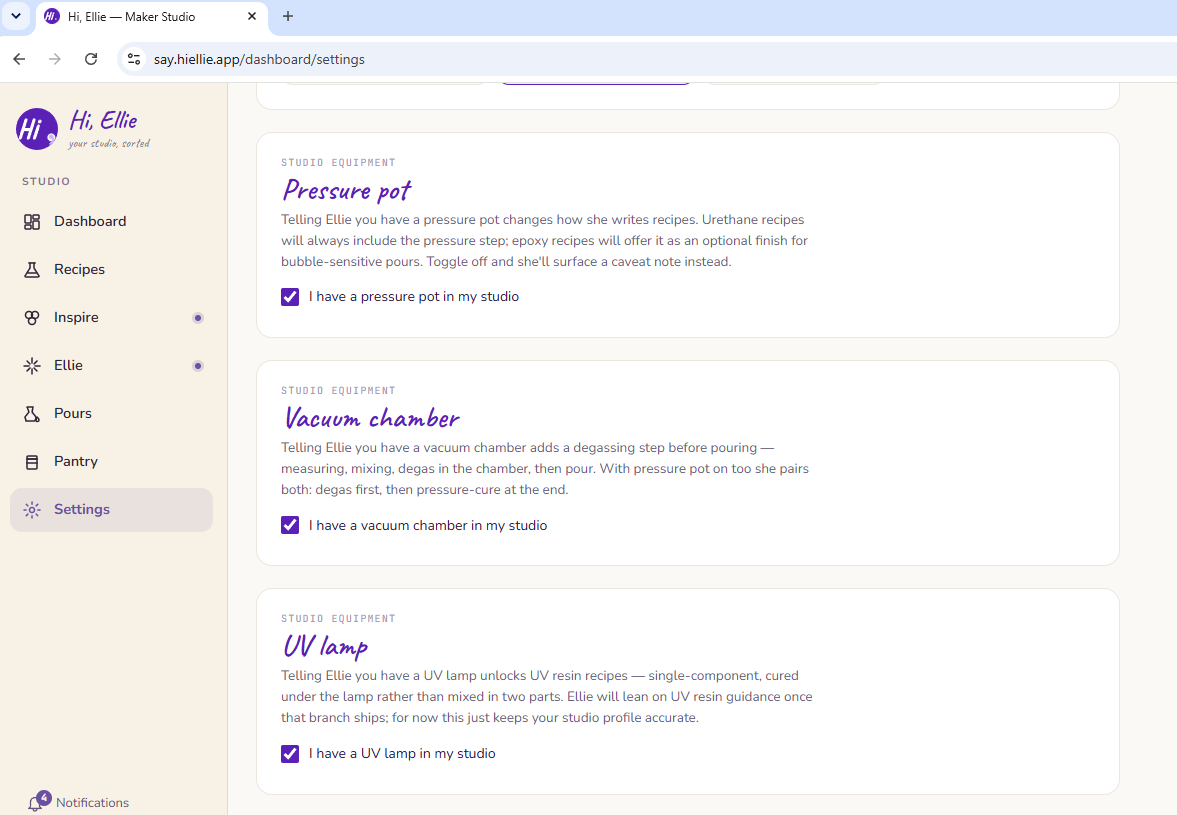
Go to Settings → Studio equipment. Three toggles:
- Pressure pot
- Vacuum chamber
- UV lamp
Turn on the ones you have. Changes take effect immediately for any new recipe Ellie generates.
These are studio-wide settings, so changing them is owner-only — editors and viewers see the toggles but can't flip them.
What each toggle does
Pressure pot
When enabled, Ellie adds a pressure-cure step to resin recipes — placing the pour under pressure to suppress bubbles during cure. She'll specify the PSI range (typically 40–50 PSI) and cure time for the resin you're using.
When disabled, Ellie omits the pressure step and may suggest alternative bubble-reduction techniques instead (like a torch or vacuum).
Vacuum chamber
When enabled, Ellie adds a degassing step before pouring — pulling a vacuum on your mixed resin to remove trapped air bubbles before they set. She'll describe the cycle: pull vacuum, hold until bubbles peak and collapse, release, stir gently, pour immediately.
When disabled, the degassing step is omitted.
UV lamp
Toggling the UV lamp on records that you have UV curing capability. Note: the UV lamp toggle is data-only at this time — it does not yet change the steps Ellie writes. This will be used in a future update to support UV resin workflows. For now, set it accurately so your studio data is complete.
Changing equipment mid-recipe
If you change your equipment settings after building a recipe, the existing recipe steps won't update automatically. To get updated steps, ask Ellie to revise the recipe — she'll regenerate the steps with your current equipment settings.
Equipment and the recipe wizard
Your equipment settings inform all three wizard modes (Guided, Collab, and Advisor). You don't need to tell Ellie what you have each time — she already knows from your settings.