Bath & Body wizard modes: Guided, Collab, and Advisor
The three modes work the same in Bath & Body as everywhere else — but only two of the five products are tiered, and the lye gate is identical in all three.

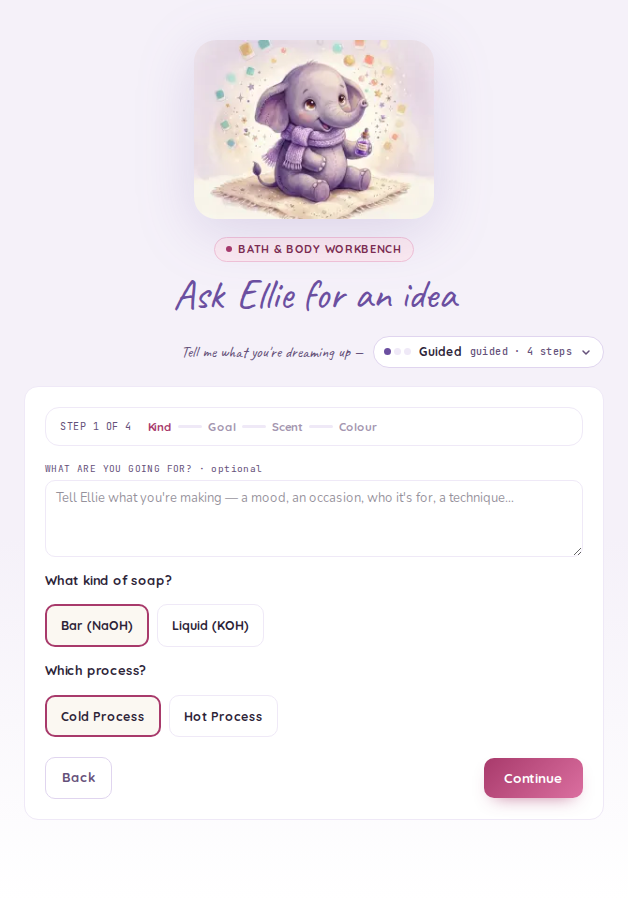
The mode pill sits at the top of the wizard and asks "How chatty should I be?". Tap it and you get the same three choices the resin and candle wizards offer, with the same long labels: Just getting started, Comfortable, and Knows what they're doing.
Your choice is remembered in the browser you set it in — it isn't stored on your account, so a different browser or a fresh profile starts from the default. It is also independent of the experience level on your Settings page: changing one doesn't move the other, in either direction.
Which products are tiered
This is the part that differs from candle and resin. Only two of the five Bath & Body products have enough formulation depth for the three modes to mean anything:
| Product | Modes? |
|---|---|
| From-Scratch (CP / HP / Liquid) | Guided · Collab · Advisor |
| Lotion / Butter | Guided · Collab · Advisor |
| Melt & Pour | Flat — 3 steps |
| Bath Bomb | Flat — 4 steps |
| Scrub | Flat — 3 steps |
The flat flows aren't a stripped-down mode; they're the whole recipe. A Melt & Pour has no lye math to scale guidance for, and a bath bomb is a dry mix, a scent and a colour — there is no expert surface hiding behind a switch.
Guided — "Just getting started"
One decision per screen, as a short card stack. On From-Scratch that's four steps: Bar (NaOH) or Liquid (KOH) and the process, then a goal preset, then your scent, then your colour. Ellie assembles the oil blend behind the preset — you're choosing what the soap is for, not writing a blend.
The colour card is also where you choose the design — Plain, Layered or Swirled. Guided keeps it to one decision: Plain is selected for you, Swirled means an in-the-pot swirl, and either of the other two divides the batter into two parts and gives you the same colour picker once per part. There is nothing else to set — the trace to aim for, the pour instructions and how much batter goes into each part all follow from the design you picked.
The goal presets you see are filtered twice — to the alkali you picked, and to what Guided shows. A Bar maker sees six: All-Purpose, Moisturizing, Great Lather, Long-Lasting / Hard Bar, Shampoo Bar and Shaving Soap. A Liquid maker sees all three liquid presets: Clear & Mild, Rich Lather Body Wash and Concentrated Dilutable Base.
Two bar presets — Facial / Sensitive Skin and Utility / Kitchen — are held back from Guided. They appear in Collab, whose preset menu is filtered by the alkali alone, so the whole bar set is on the table there. Advisor has no preset picker at all — you author the oil blend line by line and set the superfat yourself.
Each preset carries its own starting superfat, and that's much of what separates them: of the six a Bar maker sees in Guided, Shampoo Bar starts at a generous 8% while Shaving Soap starts at 2%.
Collab — "Comfortable"
Everything condenses onto one screen. You set direction — the preset, the scent, the colour, the batch size — and Ellie fills in the blend and sanity-checks the numbers.
Collab offers the same three design chips and then the two decisions Guided pins for you: which swirl (in the pot, drop or hanger) and how many parts the batter divides into, from two to four. On a layered recipe the parts are equal. On a swirl the first part is the base and takes half the batter, and the accent parts split the rest — the accents are swirled through the base, so the base is never the smaller part. Each part gets its own colour picker, and the trace to aim for is shown here too, read-only.
Advisor — "Knows what they're doing"
The full control surface. You author the oil blend line by line and set the superfat yourself, and the lye and water weights recompute live off your edits — through the same code that computes them on generate, never a model's arithmetic. On a lotion, Advisor is where you set the water / oil / cool-down split and the emulsifier rate directly.
Advisor is also the only mode that lets you set how much batter each part takes. Type a percentage per part; they're balanced to total exactly 100% when the recipe is built, so what you see on the recipe is what adds up. A swirl needs its base part to be at least half the batch — the accent colours are swirled through the base, and the wizard says so rather than accepting a split that isn't a swirl. The trace to aim for is shown here as it is in Collab, and it is read-only: it follows from the design, so there is no way to pick a swirl and then set a target that makes it impossible.
If you author your own blend and then pick a swirl, the blend editor tells you when that blend will trace fast — hard butters and coconut-heavy blends thicken quickly, which turns a swirl into a poured brick. It's a heads-up, not a refusal: your blend is left exactly as you wrote it.
Switching modes
Switch whenever you like; what you've already typed comes with you. Moving down to Guided restarts you at the first card, moving up lays your picks out on one screen.
Designs are for cold process only. Layers and swirls need batter you can divide and pour, so the design chips appear on Bar (NaOH) recipes made by cold process. A hot-process recipe, a Liquid (KOH) recipe, a Melt & Pour and a bath bomb don't show them.
The lye gate does not move. Whichever mode you're in, a From-Scratch recipe shows the lye acknowledgment with its computed lye and water weights before it will save — identical at every tier, with no bypass. See Working safely with lye.