Choosing Ellie's voice
Pick the voice Ellie uses when she reads steps aloud in Bench Mode and chats with you in Conversation Mode.

Ellie can speak — in Bench Mode she reads your pour steps aloud, and in Conversation Mode she talks back. You can pick which voice she uses from four options, and preview each one before deciding.
Where to change it
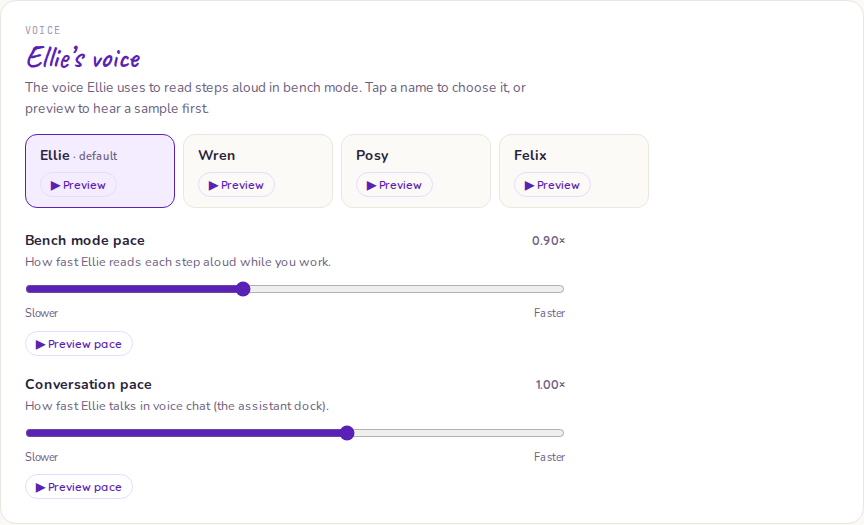
Go to Settings → Voice. The voice selector shows four options:
| Voice | Character |
|---|---|
| Ellie (default) | Warm, measured, knowledgeable |
| Wren | Bright, friendly |
| Posy | Smooth, expressive |
| Felix | Deeper, steady |
Tap Preview next to any voice to hear a short sample before committing. Select the voice you want and it saves automatically.
What it affects
Your voice preference applies everywhere Ellie speaks:
- Bench Mode — reading pour steps and sub-steps aloud
- Conversation Mode — talking back during a hands-free conversation
- Push-to-talk — reading Ellie's reply after you release the mic button
It does not affect typed chat — Ellie's written responses look the same regardless of voice setting.
Personal setting
Your voice preference is saved to your account, not your workspace. It follows you across devices — set it once on your phone and it applies on your desktop too. Other workspace members have their own independent voice setting.
If preview isn't available
Occasionally the preview may show as unavailable — this can happen if the audio service is temporarily unreachable. The setting still saves correctly; you just won't hear the sample until the service recovers.