Advisor mode deep dive: techniques, start options, and Check my recipe
Advisor is the hands-on wizard mode — pick techniques and have Ellie critique a recipe you already have.

Advisor is the most hands-on of the wizard modes — built for when you know what you want and would rather steer than be guided. Here's what it gives you that the others don't.
Techniques

Advisor lays out a set of technique chips — eleven of them — so you can tell Ellie the effect you're going for.
Let Ellie Dream Big

Don't want Ellie to be limited to what you have on hand? Check Don't be constrained by my current inventory, and Ellie will use her own database of top colorant products to try and find the perfect match for your idea.
You Control the resin

Here you can select exactly what resin you want to work with for this pour. Have something new you want to try with UV resin? Select your UV resin and go for it.
Start with...

A theme or mood
Set the vibe. Tell Ellie exactly what you are thinking. This is where you can expand on an idea.
A mold to fill
Start with what you want to make, and let Ellie help you fill in the rest.
A colorant to feature
Pick up to 3 colorants to include; Ellie will fill in the rest.
Show me a photo
Runs through the same actions as an Inspire session.
Check my recipe
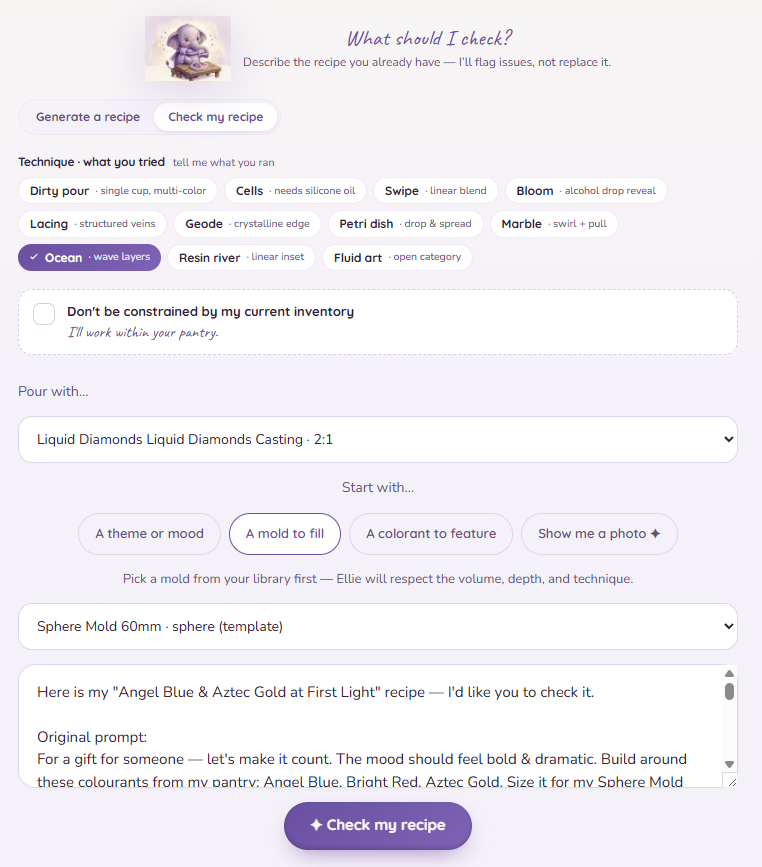
Advisor includes Check my recipe.
Put your recipe name in the vibe box, or you can optionally run Check my recipe from the recipe itself.
Heads up: "Check my recipe" critiques a recipe you already have — it doesn't create a new one. Reach for it when you want Ellie's read on something you've made, not when you want her to build from scratch.